Looking at the timestamps from the activity, they probably haven't seen this concern yet. I'm guessing they are West Coast USA and are still asleep for the night. Let's give them some time.
Indeed, I was asleep. We have a lawyer who handled the terms, presumably adding a bit of boiler plate text that we should have removed. This should definitely not be the case, thank you all for flagging. Will update today.
He's not talking about the contents of the ToS. Click the back button on the page, it takes you back here. You'd expect it to take you back to the homepage of the site. If you deeplink to that page then there's no way out other than editing the URL.
I'm pretty sure he does. “The terms of service prohibits deep linking” is a pretty unambiguous phrase, and it is prohibited indeed:
> Additionally, you agree not to, and will not assist, encourage, or enable others to: [...] Deep-link to any portion of the Services any purpose without our express written permission
The fact that the back link is broken on that very page adds yet another level of irony here though.
Is it just me that I like websites with URLs on the browser while trying to avoid Apps wherever possible, especially on the desktop? Please don’t take me the wrong way; I was the one developing apps for Pocket PC devices in the early 2000s.
For instance, “Twitter” is the first featured “app” I see here at Store.App. However, when I use Twitter, I tend to click away on links and read/browse them. How are people using websites these days?
I may be missing something, and I’m eager to be enlightened.
P.S. Best wishes to Store.App and hope it succeeds for those who need it.
Yeah Twitter is an awful use case. Any app that has lots of external links or that you want to spawn new tabs is better just staying in the browser.
The ones that work better as installed apps are things that you kinda just leave open in their own window: instant messaging apps, email, music streaming, etc.
There's no reason for these to have a URL bar at the top, and "installing" the things often unlocks global hotkeys and other bits.
You definitely are not alone. Even on mobile, not only desktop, if I can do away without an app I'd really do that. We have a movie booking app in our country BookMyShow (the less said about this company and practices is better) and I just book it on its mobile website mostly (though I try to book in the theatre and almost always I have to make a scene to get a print ticket when I refuse to share my number fearing certain spamming).
Twitter, Reddit - as you might know there are no non-official apps and their mobile websites, which are bad, are much better than the apps.
A lot of services are unfortunately forcing you to use the app instead of the web. And a lot of the apps in your country are available in the AppStore India only which is extremely annoying for me as a German in India who has to switch between local and foreign Apple IDs frequently.
Depends on how you organise things. I generally DON'T close most tabs I open individually. I tend to open more and more tabs until I'm forced to close them all or most of them to keep things organised and then I start again. With habits such as mine, opening a webapp as an application rather than a tab will make it persist longer and be easier to find.
Additionally, while 99.9% of users won't take advantage of this, your operating system has all sorts of features to manipulate the window of individual GUI applications which it can't use in the context of tabs. Unattended automation of the GUI has all sorts of interesting applications.
You can also get rid of some of the wasted space at the top of the screen.
Given how toxic many mobile apps are and how a pretty significant amount of time they’re still just a web app under the hood, I think native apps have already lost the war.
So like yourself, I very rarely install apps these days.
Most quality apps are native apps, they are not just web app under the hood. Then you are either using uncommon or niche apps, or you perhaps you are on Android (Play Store is a nightmare these days).
The App Store (iOS) may not be perfect but there are truly quality apps and the developers have a real incentive to maintain these, seeing that the willingness to pay for apps is high in the Apple ecosystem.
iOS and while I don’t go round decompiling packages all that often, from what I’ve seen most companies write a custom UI online and use iOSs additional web features to mimic a native experience. To the end user it doesn’t look any different, but to the developers it is quicker to build and easier to update (ie every UI tweak doesn’t require going through Apples approval process).
This obviously doesn’t apply to games. But even there, there’s a surprising amount you can do with HTML5 et al on iOS if you wanted.
When you also factor in Electron on the desktop, a surprise number of “native” applications these days are really just websites in a container.
But outside of messaging, music and browsing the web. how many native apps do you/people actually use?
Because I'm personally under the impression that this is what most people use their phone for (maybe play a game or two as well). tough this might also depend on the countries where I lived (and when).
Some people are big app users, but very few have a variety of niche apps installed. Those same people probably don't use computers for more than the 1% they are capable of doing.
I think a vast majority still uses apps outside of messaging and music though, because social media exists. Instagram, Facebook, Twitter/X, TikTok, SnapChat are all apps and it's absolutely the case that they are better off being true native apps, which they are.
> If you’re wondering “Is Instagram a native app?” or “Is Facebook a native app?”, the answer to both is no. They are both hybrid apps with numerous “native” features.
This is the opposite for me. I used to use Twitter and Reddit constantly through 3rd party iOS apps. Both platforms banned 3rd party apps and I simply don’t use the platforms anymore.
They added enough friction through ads, cookie banners, forced login to view content and more ads that I don’t care to use them anymore.
I’m using a 3rd party app to view HN and I probably visit 3-4 times a day.
Are you not concerned by how much data those apps could be harvesting? There is a reason Reddit et al push you towards their app and it isn’t because they make money from selling it on the App Store ;)
I use web apps as a cheap and simple way of making my own apps for my phone. I've also used them for making info displays on ipads (guided access on iPad can lock down the iPad to just that one app).
Recently I've made a web app for controlling my lights at home and a web app for tracking when my infant eats.
I don't tend to install anyone else's web apps though. I typically just used their website or if need be install their native app.
I like the concept a lot, but I also think it should filter to only installable apps by default. If you detect a user is on a mobile device, it would probably also make sense to enable the mobile filter by default too.
It would also be nice if there was an offline-capable filter as well, but maybe I missed it?
I also notice the Developer tab is not part of the PWA, which kicks you out of the PWA experience on iOS, even though it seems like that marketing page could be contained within the tab? It might also be nice to link to resources for getting started on developing a high quality PWA, if any resources like that exist.
Now that PWAs on iOS can finally show notifications (if the user wants), I hope more developers will take them seriously. I trust browser isolation more than I trust native app isolation, and a lot of the native apps that I use would work perfectly as a PWA.
This has been such a great addition, once it was officially added I've quickly built a small web app that can now distribute notifications to all my devices effortlessly, with a single codebase and with no need to pay the dreaded $99/yr subscription. Haven't released that publicly but I might at some point once I clean up the mess that inevitably resulted from me writing it in around 2 hours.
Thank you, this is great feedback. What to show and when has been an ongoing convo - we chose to evolve this based on supply side milestones. Keep an eye out for some cool updates :-). We don't yet have the ability to filter by offline-capable, but that's a great idea. Re the dev tab, this is a work in progress - right now a few things are split apart, but we'll be folding everything back together at some point.
Re notifications, 100% agree - this was a major roadblock. The next few years are going to be very interesting :-P
But isn’t “installable” the entire point of this site, and your company?
If you want you help the discussion against native apps, you need to clearly take the side of proper installable PWAs, not just links to websites. It feels misleading and gives argument ammo to the “native always” crowd.
Nothing that can be blamed to the (web)app store, but I found it curious the overall very poor first impression experience that these small niche (or not so small) websites tend to offer... some have the feeling of just being an excuse prototype to be a quick grab for money / user accounts. I guess that not too unlike actual installable mobile apps, to be fair.
My experience has been:
I tried the Linear app, but couldn't see anything more than a pretty landing page before an account was required. Next.
Replit. Wanted to get a feeling of how it works, but again, just a landing page and a button that says "Start creating" but instead it should say "Log in". Next.
OpenDream: "Create original art in seconds with AI". Cool -I say to myself-, let's create a couple of crazy pictures just for fun. Oh, well, these at least don't pretend to be fancy, the login prompt appears first thing right in your face. Next.
Replika. An AI companion, so curious. But the website's only purpose is to show a "Get the app" that brings me to Play Store. Wouldn't call it a webapp. So next, I guess?
Let's have some fun with some silly phrases in VoiceMaker! But after trying it out with "Casper, Male", I just wanted a second try with "Patricia, Female", and it already prompted me and didn't let me play anything any more. Bummer. Next.
Funnily enough, the best initial experience of these webapps, by a wide margin, has been Tower Game. It just does what it promises. It's a tower game. It runs straight out, and lets you play. No fuss. 10/10, best webapp of the ones I tested!
(PS.: PromptPerfect, "Your IDE for professional prompt engineering". Wow, it's crazy that we got to need such things, the world of LLMs is running too fast for me)
> I found it curious the overall very poor first impression experience that these small niche (or not so small) websites tend to offer
Because PWA is largely just hype with nothing to show for it. We've been hearing about how they are just as good or better than native apps for years now. And yes, the only thing we get are poorly packaged barely working mobile sites.
As a Linux desktop user, web apps are very much welcome. Apps like Photopea and Adobe's new Photoshop web app are things that make the Linux desktop much more viable as a platform.
This is great feedback. There are some modifications coming that will enhance the discovery process. It's very early in our journey, so I'd encourage you (I'm biased, of course) to create an account and stay tuned for updates. We believe the web is in the early stages of a renaissance of some sort.
It's quite hilarious that the commenter didn't want to create accounts in all the apps he described, still the crux of your proposal is .. creating another account.
I am on desktop. There is a button that says 'Get'. When I click on it, I get prompted to 'Install the app on your device'. Which just sends me to the home page?
I just check on mobile, same thing. How is visiting a website's homepage 'installing the app on my device?'
I think some people might be turned off by the word Installing, when you're just visiting a website?
The word Get seems misleading, because you are not 'getting' anything. If anything Visit might be more appropriate.
There's better functionality coming, but for at the moment, users need to jump over to the apps domain to install. "Getting" or "Installing" means adding to home screen. The flow isn't ideal at the moment, and some web apps aren't installable (e.g. don't have a manifest/service worker), but it's early in the movement. You're not really missing anything, other than the fact that we have to start somewhere :-P
We've been getting feedback to keep the "installable" filter on by default, which I think is a good idea. We'll implement tomorrow. Eventually this'll evolve quite a bit, but we're taking a measure approach. Stay tuned! :-)
Yeah agreed - I thought it is a library of all these apps in one place which could be a cool thing. However otherwise it is just advertising for these apps listed
Feedback: The home page's horizontal carousels/reels lack trackpad scrolling functionality. Interaction is limited to the arrow buttons on the side. To enhance user experience, it would be beneficial to make them scrollable via trackpad, similar to the Apple Store website.[0]
Thank you! It was pricey, but not as bad as it could've been. I pre-ordered it a month before .app became available as a TLD, and bought it on the first day of availability (May 2018!). I've been planning on building this for some time :-P
Re carousel feedback - thank you! We've talked about this but have been prioritizing some other features ahead of it. That said, your feedback helps us prioritize higher. Keep the feedback coming, the more the better! Also if you want to connect offline, lmk.
Just to 2nd it. I came to the comments first, but after visiting the site, it does feel unnatural. Also to pile on, having to multi-click the next button one at a time per app feels tedious.
Seeing how you are at this stage though, color me very impressed. I've just never paid attention to PWAs, so seeing them available like this gave me a totally different (positive) consideration for them. I would love to see numbers of use just to see how widely used PWAs are. This isn't an idea for the UI for popularity per app, but just for PWA in general. Just in terms of if this is something I should be considering. Great job and good luck!
Agree on the carousel. The buttons are small and clunky — if you miss them you get a page you don't want. Just use a div with overflow:auto for native browser scroll.
I'm going through this very thing now. I'm focused on getting the backend features working, but getting pressure to make the tiny tweaks to the UI. Once you open the UI to actual users, priorities quickly get rearranged. The UI complaints are the punch in the "everyone has a game plan until they get punched in the face" phrase.
I really hope your store takes off. I will say a prayer or two to this end. May your good character flourish and may you avoid all temptations that come with gatekeeping
Apple and Google's app stores are death. They motivated me to re-code my c and java-based iOS and Android apps in js+wasm (SPA/PWA) from scratch. For a long time, I announced it with its proper name ("PWA"). I became very frustrated every time I interacted with users who asked "what does that mean?". So now it's simply "Web Version"
Thank you! We have a very strong ethos around democratizing distribution and we plan to be careful not to go down a path to becoming what we hate. We're here to serve developers and users, and we'll look for guidance from our user base constantly. Re "PWA" I can empathize - I've found that for the majority of people, "installable web app" seems to register more effectively, but hoping that "PWA" becomes more broadly understood. Thanks again for the comment, and we look forward to serving you :-)
Awesome, thanks for the feedback! That's a great idea - I've posted it in our internal channel. Also, you should have been approved for a dev account - we're excited to have you onboard! Please feel free to let us know how we can help - our mission is to help web devs grow their business.
Thanks, works well - just one small bit of feedback there: wish there were some hints on aspect ratios for the screenshots (or they should be displayed at the image's aspect ratio). Currently the sides get cut off: https://store.app/drop-lol
Also, would be nice to have a "more by this developer" section. (Or any other "similar to" recommendation section.)
Hi, I'm an engineer at Store.app. Thanks so much for the feedback, love the listings (and nice lighthouse score!). We're definitely planning to surface more developer information on the listings, this is a great idea. Your profile page does currently highlight the apps you own with some of their metrics and a feature of our verified plan is you get an "About the developer" card on your listing that links to your profile. More on the way!
Ah this is perfect! Once few years ago I had https://web-app.store/ (I no longer own that) and attempted to do exactly the same thing as you did, @presson. Funny how, besides your high-quality TLDN, it's basically the same name/TLD but reversed. For posterity sake, here is what it looked like:
For comparison, I chose a very different route. On my personal website I maintain a small directory of web games that have good UX on both desktop and mobile. Link: https://merely.xyz/games
It's extremely low tech; just a static website, no reviews, no concept of apps. The scope is much smaller — and it won't grow beyond what I can test. But I guess the goal is similar, promoting user friendly web content.
That's amazing! We definitely stand on the shoulders of giants. Hoping that now is finally the right time for the web to make the jump. LMK if you ever want to connect and talk shop!
I am on phone so it may be different for desktop but the button to show only installable apps can be improved to make it clear when it is pressed and when it's not.
I don't just want installable apps, I want installable apps to be offline or at least offline first too with optional login. I won't even consider it installable if it needs Internet to be of any use. Please add a way to filter these too.
Great domain and it looks it can become a defacto web store for apps.
One piece of feedback is that it doesn't restore the scroll position when going from list page -> detail and then pressing back. That breaks browsing scenarios where you're looking at the details of apps as you scroll down. In general PWAs often get this wrong. I wish more of them were testing back navigation.
This is awesome, as PWAs get better I really REALLY hope they'll challenge the big app stores. So far no one I know outside of tech knows or cares that this is even possible, but I hope sites like this will gradually change that and also change people's perceptions of what has to be a "native" app.
I don't see any reason why in 10 years we should still be paying the 30% tax (+ the $100/year) just to get something with notifications and offline on the home screen. Sadly there's literally hundreds of billions on the table, so there's going to continue to be huge resistance.
When I install something from those stores, I feel like there is some level of vetting against malware, or at least the ability for the store to pull it if it becomes known-malicious after I installed it. 30% might be too much of a fee, but some payment for that service makes sense, I think.
Are PWAs somehow immune to this concern by virtue of running on the way stricter feature set that a browser offers? If they can prompt the user for access to all of these APIs [0], and the user allows it, and then it later becomes malicious while able to run a service worker in the background, that seems a bit more concerning than regular non-PWA browsing that can't continue to run after the tab is closed.
Service workers aren’t a magic “run forever in the background” technology.
I’m fairly sure PWAs can’t run in the background at all on iOS or Android, except for possibly a brief moment after the PWA receives a notification, and the service worker doesn’t have access to much of anything during that interval. If anyone can link to something that demonstrates otherwise, okay, but I have checked on this in the past, and I don’t think so.
Native apps have been caught with their hand in the metaphorical cookie jar over and over again. The App Store review process is largely ineffective. Apple apparently didn’t even realize that apps were doing sketchy things with the clipboard until it became a major headline[0], and this is only the tip of the iceberg of “things App Store review didn’t catch”.
Native apps continue to find ways to bypass sandboxing that the OS applies.
Browsers naturally take a much more adversarial posture against the code they’re running, so the sandboxing is far stronger.
Apple has spent at least a decade marketing[1] to convince people the App Store is synonymous with safety. Given how detached this seems to be from reality, the simplest conclusion seems to be that they do this because they really want their 30% cut. The marketing campaign seems to be working too well. In reality, the browser seems to be substantially safer, although nothing is perfect.
“The apps you love.
From a place you can trust.
For over a decade, the App Store has proved to be a safe and trusted place to discover and download apps.”
> When I install something from those stores, I feel like there is some level of vetting against malware
I don't.
Google Play has served me malware on my device (touchpal) that went undiscovered forever. And tons of high search ranking apps are straight up scams or data harvesting fronts even if they aren't legally "malware." I feel more secure about web apps because at least I am protected by the browser's sandboxing/fingerprinting protection (and in my case Cromite's extra blocking).
IDK about iOS, but Google Play is a dumpster fire. I hope it burns to the ground.
I totally agree, the security issue is the biggest thing app stores have going for them. I think 2 things.
1. if momentum goes PWA's way, smart people will work on these problems. I'm not saying I have the answers, but if I can root for either 2 megacorps or the open web, I'm going open web every time. (again, not saying we're there yet with PWAs)
2. If an app store's only function is vetting software, we can have an open market for marketplaces. Anyone can build their own app store and, with enough reputation, become trusted in the eyes of consumer's, just like we trust Apple The difference is in a free market, that 30% and $100 drop dramatically, I would wager to something more like 5% and $0.
At those rates, having an app store where people feel the software is secure, can trust reviews/ratings etc seems reasonable to me. PWA doesn't have to mean otherwise
It's up to all of us to build the future, brick by brick. What looks impossible today might look inevitable in hindsight. Ok sorry, enough cliches from me for the night :-P
Yeah i know, hence "So far no one I know outside of tech knows or cares that this is even possible, but I hope sites like this will gradually change that and also change people's perceptions of what has to be a "native" app."
> anybody developing mobile apps knows that almost nobody downloads the company’s app, and it’s just there for vanity and clout
not PWAs, I’m saying that ios/android apps dont have much traction for most companies
many of the reasons are that discovery is bad , and many people have run out of space on their phones, and generally just aren’t interested in another app
but PWAs solve this by at least letting people experience your service
I love it, maybe finally developers will no longer be under the mercy of apple/google store! Probably the only thing PWA fails to do now that anything needs access to the hardware say wifi/Bluetooth scanner and such, and big games too, the rest of the apps, I don’t see why it needs to be installed from app/play store.
I see your point, but are they under this site mercy? This site is like a directory rather than a policy maker like app stores, it wont take % of any subscription for starter plus all the pros of lower development costs and what not. Say this site suddenly decided to remove your app? So what, your users can still go to your site and have the PWA, now if Apple decided to do the same to your app, good luck getting anyone to use it. Now is PWA the ultimate replacement? Certainly not, access to hardware, performance wise, games, you will still need them, but other than that, I think it’s a step forward.
I like the idea and execution. Is good spread the PWA feature of the web to battle the duopoly of native app stores, even if PWA has their disadvantages.
Feedback: I'm browsing the site on Firefox desktop, sadly it doesn't support install PWA yet. You may want to add some banner for Firefox users alerting about that.
That's great feedback. It is indeed unfortunate that Firefox has shied away from supporting modern browser features. We will be showing relevant feedback based on your browser when you launch an app - is that sufficient for you? Seems like that's the right CTA to advice a user to switch browsers, but curious if you think it's imperative to have this info at the beginning of your discovery journey.
Any advice for PWA developers who are trying to make use of possibly attached hardware? I'm looking to build a POS app that needs to connect to a receipt printer and scanner, but having trouble finding support for the printer bit. Trying to avoid any pop-up dialogue that requires user confirmation.
We use bluetooth thermal printer for a few of our out of internet travelling salesman.
Main problem is almost every other bluetooth printer type/brand need a little print layout adjustment.
If internet connection isn't an issue, you can try papercut.com or google cloud print or setup you own IPP and connect to normal printer.
There are also savapage.org but papercut already work for us so haven't try that one.
Keep in mind that WebUSB is exclusive to Chromium-based browsers — it won’t work on Firefox or Safari, and given how Google disregarded Mozilla’s and Apple’s feedback on the spec that’s unlikely to change.
Pretty cool! I tried to list my app but the screenshot upload doesn't seem to work -- it won't accept any files I've tried via drag/drop in Chrome or Firefox. I've been able to upload files to other sites without any issue (running Linux).
Thank you for the feedback, we're looking into this. In the meantime, you should be able to upload from your files if the images have the correct aspect ratio. If you continue to have issues, ping me at support@store.app and we'll make sure everything gets sorted out.
Actually, it's my own fault -- I assumed the area in the preview that said I hadn't uploaded any images yet was the drop target, but it's not, that's over in the sidebar. Cheers!
I've had them go missing just by doing an OTA update of my phone, and I don't think it was even a major Android version. Or maybe it was a Play store update of the Chrome app, I forget exactly. But it was one of those things that's not expected to eliminate data, yet it did.
Very cool, working on something similar here - https://mu.app - more of a super app. It's great to see such a positive response to an app store for web apps. There's definitely a need for evolution away from the current app store model, which is heavily taxed with 30% fees plus $100/year dev fees. I think we'll see more things like this appear in the near future.
I signed up as dev to get my webapp listed. I stumbled upon your priced plans, and was wondering what a 'direct download link' is and why I would pay $10/month for it.
Hi! That was something experimental that we've deprecated. $10 / month gets you verified reviews and a verified badge on your developer profile. There's also some other cool stuff coming very soon. Ping me at support@store.app if you want to learn more. I can also give you a coupon if you want to take it for a test spin.
Maybe I'm being selfish, but I'd love an ELI5 section. I've actually installed my own web apps as PWA's, as well as reddit and others, but I still have a shaky understanding of the best way to do it. Would be nice if the best practices were laid out in no uncertain terms.
PWA button filters down to only web apps with a manifest + service worker. Unfortunately, Firefox is a bit behind in adding some of the features that make PWAs, well, progressive. If you're on iOS, try Safari or Chrome.
Is there any web app that implements badge notifications correctly? I'm not a fan of notifications in general, but the badge counter is something I value. I've never seen a web app that implements badge counters. Is there some difficulty with this functionality?
Nice as an option but as a mobile I user my first choice is always going to be a proper native app. Faster, better integrated and not just some web page pretending to be an app. PWA's are very useful however when there is a lack of an app, and certainly there are use cases.
Indeed, the good point is not relying on any store to bring able to "install" or use right away, so Android and iPhone users aren't blocked from sharing the same experience.
Awesome! Were you able to add it successfully? We have a widget that you'll find under your claimed app to showcase your listing states, and we have a few more things that you can use on your app coming in about a week. If you're interested in early access, shoot me a message at support@store.app and we can show you what's coming.
What a tragedy that what used to be called "installing" is now mocked by the industry lobby as "sideloading", and what used to just be "visiting a web page" has taken its rightful place.
I have not and probably will not ever "install" a "web app". This is literally just a list of web sites. It's no more useful than Yahoo circa 1998 but now the bookmarks are on your desktop or homescreen rather than in your browser, where you're going to be taken anyways if you open one of them.
I like the idea of "installing" a web app that basically creates a bookmark to a webpage, because the alternative is installing an actual app. It's nice to have things all basically browser based as it gives the developer more control of the product and creates a single reasonable platform. I hate going to linkedin or Reddit or similar websites on mobile and them forcing me to use their app. It also breaks the dominance of centralized app stores like android and apple
Yes. Although this depends a lot on the quality of the software, native apps tend to be much better in terms of UI and performance, and they tend to use less system resources -- sometimes a lot less.
Nowadays i would argue that the css rendering speed is faster than the Android UI renderer which suffers from extreme complexity. Ios might be still faster, but also much more limited. A good SPA is indistinguishable from a native app.
Properly executed, it should act as segmented cache/cookies/storage, so you can clone, delete, etc isolated versions of your sessions with misbehaving (or potentially misbehaving) services.
There is one VERY big difference between PWAs and Yahoo circa 1998: you can use PWAs without a network connection, with full interactivity. This is really important for me, and probably for anyone who travels frequently, is on a metered internet connection, or just lives in a location with poor infrastructure.
Yahoo did and still does require you to be connected to the internet, and whether that's on a 2400 baud dial-up connection or a 5G wireless link, it will still cost money and be less reliable in places.
Your average person now think of anything as an “app” or it should have one, even if it was just a wrapper for a browser, they would still install the app (1), so I think OP is in the right direction, nothing will change from the user side but much better for the developer one.
This is our hope. If we can help smooth out the messaging / install process, once a PWA is installed most apps will feel identical to a native app for most users. We used to say "web apps are apps" but now we just say "apps are apps" :-P
Off the top of my head for ios - push notifications, offline use, optimized storage options (local storage not cleared after 7 days of no use), app-like ux (no browser controls), home screen icon for easy access, background audio (sound while app is closed).
The real advantage is for devs who can build an app that feels like a native app, but with one codebase for distribution across OSs/devices, not having to pay the apple/google tax, and not dealing with app review.
I made my web app into a PWA and even went so far as to polish the home screen icon and splash screen to make it look nice once installed. However, in the end, I use the browser much more frequently, simply because I can access the URL of the page and share it elsewhere.
The beauty of the browser is that you can choose your own adventure. Being able to use or test apps in a browser tab is awesome, and it's up to the dev to choose a ux that showcases / informs the user of additional capabilities unlocked after adding to home screen. We're at the very early days of exploring what this ux can unlock.
Also, on a desktop, some websites are just more naturally run in their own separate window than as a browser tab because you frequently need to switch to/from them: e.g. ChatGPT, Gmail, Google Voice/Keep, MDN docs, dictionaries.
And you can put the PWAs in full sceen mode, whereas full-screen mode in a regular browser is almost always pointless ever since they took away tab indicators.
I'm surprised by how much easier and faster this is than installing an app from Google Play. No ads above what I really searched for. Installation is basically instantaneous.
I see there's a "list your app" (which means I can't submit an app that isn't mine, right?), but there are some high quality installable PWAs that are missing. Hoppscotch is a good example.
Not expecting you to index the entire internet and filter out all the spam. Just curious how the current list was built.
That's correct, at the moment you can only add an app that you can claim ownership of (vis dns). The current list was manually added by us + by devs who have listed their apps on our site, but we'll be rolling out a more scalable solution soon, along with some better curation. I think that's a good idea to allow users to recommend listings - we'll look into adding that soon. Would love for you to create an account so we can keep you posted on this feature / other progress :-)
How? I would like to list my finance PWA[1] but I had to create a regular account first and now wait for approval on a developer account to submit an app.
Hi! You should've been approved for a developer account. I suppose the delay could go past two minutes. We'll be speeding up this process soon. Hopefully in aggregate it only took you less than two mins :-) If you have any issues, ping me at support@store.app!
Thanks! I got downvoted for my comment but your response was worth it. I got approved in 15 minutes, but I'm not counting! It wasn't mentioned DNS verification is required for app submissions but that is good you are doing that. Now I need to go through the Google Domains / Squarespace transition: https://news.ycombinator.com/item?id=36346454
I like the site, but installable apps already have an app store. Why not target a much more underserved market—the uninstallable apps. Basically an app store for web apps that work on mobile. You could charge users for the apps and then send 70% of the revenue to the app creators.
Very nice, one issue is that (on Safari iOS 16) when I navigate back to the list my scroll position is forgotten, I could understand when using my browser back button but I used the one in the UI so I’d expect it to remember the scroll position.
Beyond that nitpick though this is excellent, well done.
There is still no way to trigger an "install on homepage" dialogue from javascript, right?
This seems to be the biggest limiting factor to me—The need for PWAs to include _instructions on how_ to install the app rather than a button to make it so.
You can check the browser user agent is running safari + !standaloneMode and show a popup modal. This is how I handle it in react.
Surprisingly it actually converts to "Installs" incredibly well. Better than some native apps I own. I think user friction is actually quite low - no 'web app > app store > mobile app' flow - just two buttons and its on the home screen, no need to login w/ apple id etc.
I really enjoy the platform and while I understand that you want a more curated experience for now, writing "List your app in under 2 minutes" on the dev page only to be met by an application form was a bit of a bummer.
Startup. Our business model is a small subscription fee for extra features for PWA devs. This will likely evolve over time, but we will be careful not to become what dislike. Our goal is to help web devs grow their business and crack distribution on mobile.
when cookies are disabled (cookie whitelisting), the website doesn't show anything at all. could have a 'enable cookies/site data storage pls' message at least
At least on mobile I struggle to find anything in the app collection, it just seems like all the icons look the same, particularly on iOS where instead of the same gear everybody else has for settings I keep wanting to skip that thing that looks like a movie poster for The Golden Compass.
On the other hand, I just type "1" into safari and it autocompletes the URL for my RSS reader, I type "n" and It autocomples Hacker News. It's so much easier that figuring out which one of 5 stylized "N"s or 3 stylized "H"s is the one I want.
(I don't know what it is but on the desktop I find icons easy to scan, yet I still find pressing the Windows key and typing 1-3 letters is almost always faster than any other way of finding applications)
The thundering herd seems to think the mobile home screen is valuable real estate but I am aggressive to delete apps not only because they are 95% "crapps" but also to make it easy to find the two or three that really are valuable. (e.g. Why do I need a Walgreens app when there is a perfectly good Walgreens web site?)


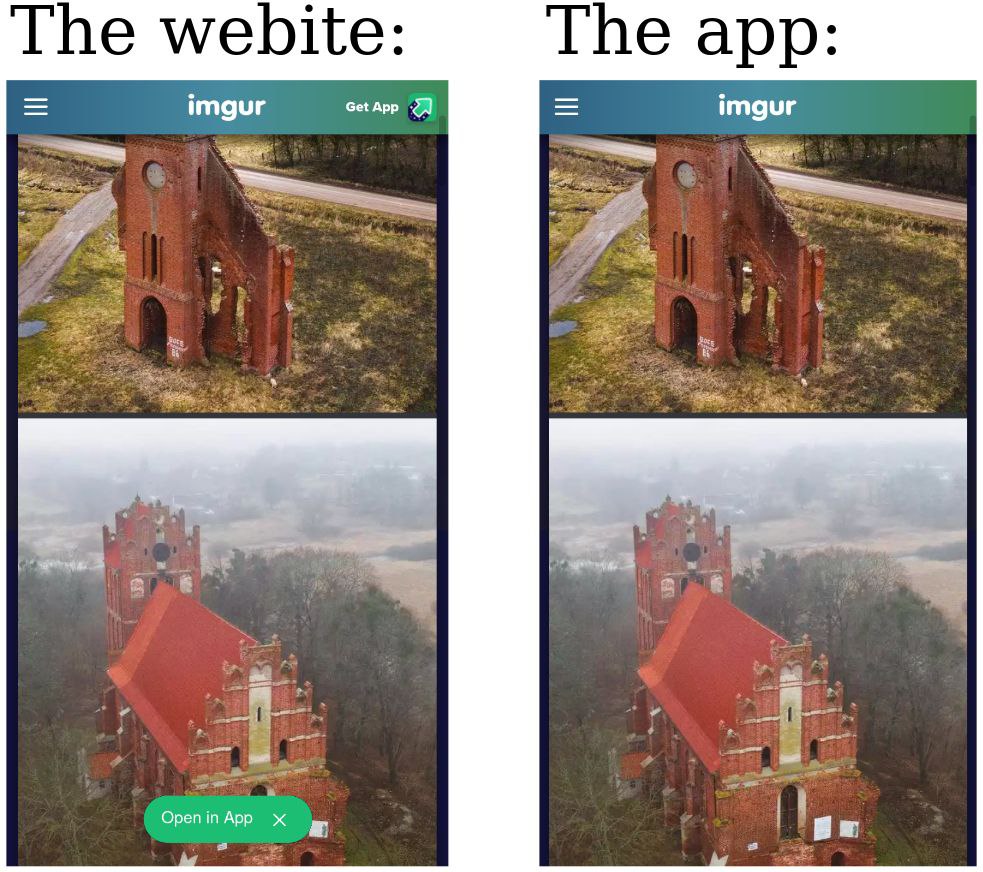

Seriously though, WTF? So much for "the web always wins".