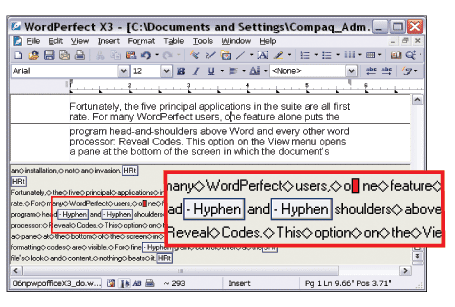
Does make one wonder just which features he's talking about here. It's been probably 30 years since I used WP for DOS, so I don't quite remember how it all worked, but I have trouble believing there's anything all that great about it.
Reveal codes was a crutch. There was nothing great about it, no matter how much it's wrapped in a nostalgic haze now. It's basically telling people "we cannot make this wordprocessor work reliably, please code up your text yourself once things go wrong".
And yes, I've used WordPerfect from 4.0 to 7.something on Dos, Windows, various unices and Linux.
So do you think the inspector in modern browsers, or "view source" are a crutch then?
I wholeheartedly disagree with this assertion, and there is absolutely no "nostalgic haze" clouding my vision. While I do agree that sometimes pulling up "reveal codes" could have revealed formatting problems caused by a bug in Wordperfect, the difference between WP and MS Word, was that you could actually DO something quick to fix the problem, rather than in Word, where the answer was often "something is royally screwed up -- you get to start over now".
Word has nothing like it. Word has a filtered view of codes.
WP laid it all bare. Every code and nuance was presented. Nothing was filtered or interpreted. I recovered many a screwed up document that you would just have to redo in Word if it ever got into such a state.
I still miss a real reveal codes in Word.
There was a public outcry for it back in the day and a snotty response from a Microsoft PM - wish I could remember enough details to see if I could find it but I'm convinced MS never really delivered a true reveal codes purely out of spite.
Word Perfect as I recall actually let you directly manipulate those codes though. Think of it a bit like toggling between an edit view and raw HTML.
Personally, I never liked WordPerfect, nor did I use it much. I used a lot of different word processors but mostly ended up standardizing on Microsoft Word (well pre-Windows) for personal use.
> MS Word used to do this. Does it not now? (I don't use Word...)
Are you sure about that? At least since Word 95, it used what you could call a two-dimensional markup system - paragraphs and character formatting was separated, and character formatting could span over paragraph starts and ends.
for example, the formatting codes could say "from character position 5 in paragraph one to character position 2 in paragraph two, set bold to opposite setting of whatever was in the stylesheet of the paragraph". that would be very hard to present in a WP-like 'reveal codes' view (or in HTML, for that matter)
Indeed. The conceptual model of a WordPerfect document is a single stream of text, interspersed with formatting instructions.
That meant, for example, that, after backspacing over a return, you could end up with a paragraph of text with, somewhere in the middle, a “set left margin to 3 cm” instruction, or with multiple conflicting instructions (I think neither was supposed to happen, but all software is buggy). I didn’t use WP, so I wouldn’t know what that meant for the paragraph being laid out. It might have been applied starting at entire paragraph that contained the instruction, at the next paragraph, or immediately.
The ‘raw view’ didn’t only allow you to see the (potential) mess of formatting instructions, but also to edit it.
So, if you knew your way around there, you could fix any problem with documents.
IMO, if WP were less buggy, it probably wouldn’t have needed that mode. I also think its existence put less pressure on WP to fix bugs.
My question was whether MS Word indeed had something similar at some point
As for WP, it's been a long time, but I don't remember having had such paragraph formatting issues needing the raw view. The raw view was mostly useful as WP wasn't really WYSIWYG (but there was some sort of print preview in DOS in 5.1) and there's only so much formatting you can show in text mode.
AFAIK Word (but I never used MS DOS Word, and mostly used Word for Mac) never had something similar. It could, and still can, show invisibles, but that’s a very far cry from showing all formatting instructions.
And as you said, its model is completely different. It doesn’t do formatting instructions inline (WordPerfect:Word is a bit similar to html without any css and html with only css)
"I also think its existence put less pressure on WP to fix bugs."
IMO this is not a good reason to deny users an escape hatch to make fixing problems at least possible. To be fair it depends on what kind of users you care about - if you're building a tool for professionals, I think this should be considered table stakes.